Support

Home   Start   PIN   Login   Support   Test your pdf document

Support menu
   OverviewCompliancePage/Font SettingLaTeX SupportMS-Word SupportPDF SupportUpload HelpFAQ

TEX/LATEX Related Topics.
  Are there style files available to use with TeX/LaTeX?
What else do I need to create PDF documents using (La)TeX?
How do I create screen quality PDFs from (La)TeX source?
Should I use dvips/ghostscript/distiller combination, PDFLaTeX or dvipdfm?
My TeX installation uses bitmapped fonts, what should I do?
I am using vector fonts, yet the PDF test says there are bitmap fonts in my paper. What should I do?

Question. Are there style files available to use with TeX/LaTeX?

Answer. Please download the following files for document preparation using LaTeX. Unfortunately, at the present time (and in foreseeable future), there is no support for plain TeX or other flavors of TeX (such as AMSTeX, ConTeXt, etc.)
Style files and LaTeX commands

The document sample.tex can be configured for US Letter paper as:

\documentclass[letterpaper, 10 pt, conference]{ieeeconf}
  % use above line letter sized paper

\IEEEoverridecommandlockouts
  % Needed if you want to use the \thanks command
\overrideIEEEmargins
  % Needed to meet printer requirements. 

Top | Overview | FAQ

Question. What else do I need to create PDF documents using LaTeX?

Answer. In addition to above style files you need following additional components:

  • A LaTeX distribution for your platform, e.g.: MikTeX 2.3 or higher (for Windows); TeTeX 1.0.7 or higher (for Linux and other *nix flavors) and OzTeX 5.1 (for Mac). Make sure that your installation uses Type 1 fonts. Earlier versions of LaTeX used Type 3 or Bitmapped fonts. These are not scalable (i.e. render well on screen as well as print). The paper submission system checks for fonts used and if it detects Type 3 fonts, the paper cannot be uploaded. We cannot assist with installation of these packages on your system, however, they all come with extensive installation notes.
  • Either Ghostscript 7.0.4 or higher (but less than 8.13) and Ghostview 4.6 combination or Adobe Distiller 4.0 or higher. There are several other products (free/commercial) in the market that can produce compatible PDF files. However, there is no support available for them through these pages.
  • Some distributions of LaTeX (e.g. MikTeX) come bundled with pdfTeX that can directly create PDF files from TeX source. However, this will require that you have all graphics/images of your document available in PDF format. It cannot convert encapsulated postscript to PDF. Its use requires minor modifications to the LaTeX source file and the details for that appear in pdfTeX documentation and are not repeated here.

Top | Overview | FAQ

Question. How do I create screen quality PDFs from LaTeX source?

Answer. Assuming that you have a LaTeX distribution for your platform with "Type 1" fonts installed. Use one of the following four options:

Using a recent distribution of MikTeX (2.3) or TeTeX (1.0.7) and Ghostscript (7.04)
Using a recent distribution of MikTeX/TeTeX and Ghostscript with GSview
Using a recent distribution of MikTeX/TeTeX and Acrobat Distiller
Using pdfTeX
Using OzTeX
Using a recent distribution of MikTeX (2.3) or TeTeX (1.0.7) and Ghostscript (7.04)
latex sample
dvips -Ppdf -G0 -tletter sample
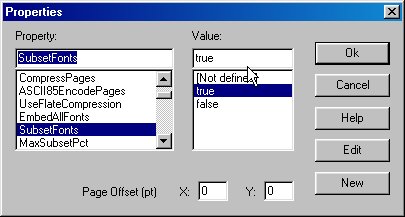
ps2pdf -dCompatibilityLevel=1.4 -dMAxSubsetPct=100 -dSubsetFonts=true -dEmbedAllFonts=true
    -sPAPERSIZE=letter sample.ps

These instructions have been tested under Windows with MiKTeX 2.3, and under Linux with teTeX 1.0.7 and Ghostscript 7.0.4.

Note that without -d[options] listed above, ps2pdf will not embed and subset fonts as required by PDF compliance and your paper will not be ready for upload.

Top of this section

Using a recent distribution of MikTeX/TeTeX and Ghostscript with GSview

If you are using MS-Windows operating system, we strongly recommend using GSview 4.6, a graphical font end to Ghostscript. It provides an easy interface for setting up the above parameters for ps2pdf.

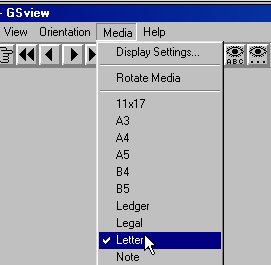
The first step is to set the media size to Letter. To do this, in the GSview menubar at the top click on "Media" and select Letter as shown below:

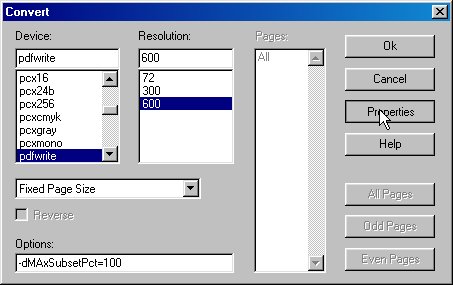
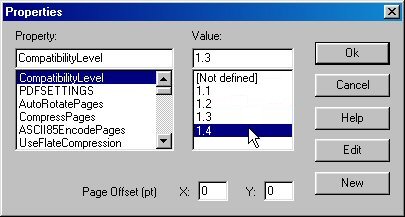
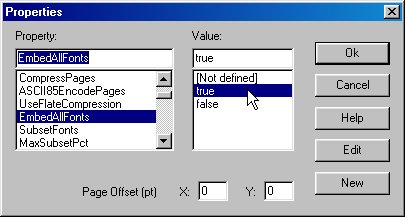
Next, click on "File | Convert". In the ensuing window, in Options textbox type in "-dMAxSubsetPct=100", then follow screenshots below:


This option makes sure that the files will be viewable by readers with Acrobat Reader 4, 5 or 6.


These two settings, together with "-dMAxSubsetPct=100" will ensure that all fonts are embedded as required.

Top of this section

Using a recent distribution of MikTeX/TeTeX and Acrobat Distiller

To produce PDF that will print well on paper as well as look sharp on the screen you must have Type 1 fonts installed with your LaTeX distribution. To create PDF, use the following steps

latex sample (if needed use also bibTeX and rerun LaTeX)
dvips -Ppdf -G0 -tletter sample (for letter sized document)
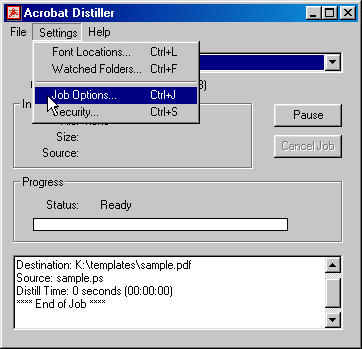
This generates the postscript file "sample.ps". Next, launch Adobe distiller. Here are the screen captures of settings in Distiller 5.0, similar settings also exist on other Distiller releases.

In the distiller select Settings | Job Options as shown in the first image -


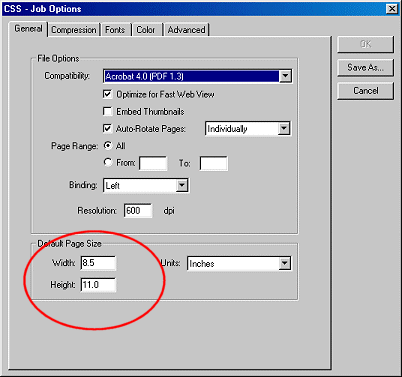
Next, under "General" tab, set paper size to Letter (8.5"x11") as shown in the circled part of the image


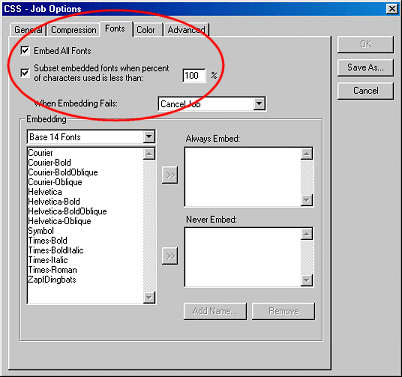
Next, click on the "Fonts" tab and enable font embedding as shown in the third figure.


You may want to save this setting as (say) a joboption CSSconferences and you can reuse it for future conferences. Alternatively, you may save distiller joboptions in appropriate folder as described below and it will set up suitable options.

Important: If you are setting up joboptions on your own, make sure that the PDF compatibility is set to "Acrobat 5.0 (PDF 1.4)". IEEE will not accept papers with PDF 1.4 or 1.5 compatibility.

Top of this section

Using pdfTeX

PDFLaTeX is a special version of LaTeX by Han The Thanh which produces PDF output directly using Type-1 fonts instead of the standard dvi file. However, it is still in beta version and does not accept all of the LaTeX packages or postscript figures. 

pdfLaTeX (+bibTeX) 

  • For this path you must convert all of your postscript figures to pdf. This can be done by "epstopdf" or Adobe's Acrobat distiller. In addition, you have to change your TeX-file, at minimum to include the .pdf-graphics. 
  • If you start a new document from scratch, intended to get a PDF, this path is the first choice, although pdfLaTeX is still in "beta-state". 
  • LaTeX and pdfLaTeX behave by default differently concerning the character-spacing. As a result, the same TeX-File compiled with LaTeX and pdfLaTeX may show different line-breaks, paragraphs, page-breaks etc. Fortunately, there is a switch in pdfLaTeX to ensure LaTeX spacing. 
  • pdfLaTeX uses per default Type-1 fonts. 

Top of this section

Using OzTeX

  • If you are using a system with OS 8.6 or lower, you will need to use OzTeX 4.1 - then you have to make sure that you have Type 1 fonts installed since the installation comes with Type 3 fonts. Else, download and install the latest version OzTeX 5.1 that comes standard with Type 1 CM and AMS fonts.
  • Download the Mac version of ieeeconf.cls with appropriate carriage returns. Some users have experienced difficulty converting the windows version to Mac leading to compilation problems.

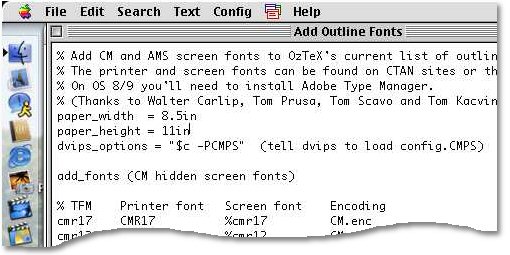
Add the following lines to your "Add Outline Fonts" config file:
paper_width = 8.5in
paper_height = 11in


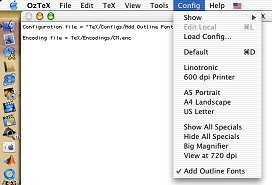
In Oztex 5.1, use the "Add Outline Fonts" config.


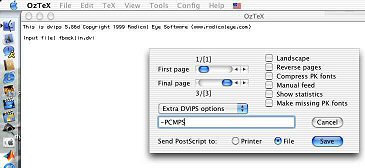
Finally, when you dvips, the options -CMPS should automatically pop-up. Leave it alone.


OzTeX hints and Images courtesy of Brad Burchett.

Top of this section

Top | Overview | FAQ

Question. Should I use dvips/ghostscript/distiller combination, PDFLaTeX or dvipdfm?

Answer. There are currently two viable alternatives in producing compliant PDF documents from LaTeX (dvips method and pdfTeX Method). The first option is currently the best one owing to the fact that the LaTeX source file does not have to be modified, all style and class files are supported, and bitmapped as well as postscript figures can be included directly into the final PDF. Both methods of creating compliant PDFs work well. However the work flow and requirements are slightly different. Of course, they all require that the TeX installation being used supports Type 1 fonts.

  dvips/ghostscript/distiller pdfTeX
Fonts Type 1 Type 1
Style Files Support all known styles Limited support
Platforms All Linux (Y), Win (Y), Mac (?)
Graphics EPS/JPEG/PNG PDF
Workflow latex+bibtex --> dvips --> PDF latex+bibtex --> PDF

dvipdfm works well, but has some bugs in processing certain types of .eps figures. The only reliable way to work with dvipdfm when including encapsulated postscript figures in your document is to first convert them to PDF.

Top | Overview | FAQ

Question. My TeX installation uses bitmapped fonts, what should I do?

Answer. All earlier TeX/LaTeX installation used METAFONT technology to create Type 3 fonts. These fonts were customized for the printing device for which they were meant. Unfortunately that does not help in creation of PDF that render well on the screen as well as print. If you have the (La)TeX system installed on your own computer, upgrade it to a newer version. Most newer packaged distributions come with Type 1 fonts. All packages mentioned above support Type 1 fonts. If you are using a Network installation of LaTeX, please request your system administrator to upgrade the installation with a more recent distribution. Unfortunately, there is no reliable way to convert the font from bitmapped to vector once the document has been generated. The changes have to be made when converting from latex --> dvi --> PDF.

Top | Overview | FAQ

Question. I am using vector fonts, yet the PDF test says there are bitmap fonts in my paper. What should I do?

Answer. It may happen that after using the

dvips -Ppdf -G0 -tletter and ps2pdf
commands your pdf document still contains bitmapped (Type 3) fonts. The most likely source for bitmapped fonts are images that might be using bitmapped fonts. You may check if these fonts originate from the graphics in the document by compiling the source file without the graphics. The solution will be either to regenerate the offending images using Type 1 fonts or to convert them to raster images (such as JPEG/PNG etc) and include them in the document.

Top | Overview | FAQ